Hola Friend... |
Thursday, November 24, 2011
Look what i found here.

Thursday, November 17, 2011
Re: Look what i found
Hello friend! |
Wednesday, June 29, 2011
Troubleshooting File Sharing in Windows XP
Method 1: Enable NetBIOS over TCP/IP and start the Computer Browser service
To resolve this issue, make sure that NetBIOS over TCP/IP is turned on and that the Computer Browser service is running on each computer in the workgroup. To do this, follow these steps.Step 1: Enable NetBIOS over TCP/IP
- Click Start, click Control Panel, and then click Network and Internet Connections.
- Click Network Connections.
- Right-click Local Area Connection, and then click Properties.
- Click Internet Protocol (TCP/IP), and then click Properties.
- Click the General tab, and then click Advanced.
- Click the WINS tab.
- Under NetBIOS setting, click Enable NetBIOS over TCP/IP, and then click OK two times.
- Click Close to close the Local Area Connection Properties dialog box.
- Close the Network Connections window.
Step 2: Start the Computer Browser service
- Click Start, right-click My Computer, and then click Manage.
- Double-click Services and Applications.
- Double-click Services.
- On the right side, right-click Computer Browser, and then click Start.
- Close the Computer Management window.
 Back to the top
Method 2: Install File and Print Sharing and make sure that it is not blocked by Windows Firewall
Step 1: Install File and Print Sharing for Microsoft Networks
- Click Start, click Run, type ncpa.cpl, and then click OK.
- Right-click Local Area Connection, and then click Properties.
- Click the General tab, and then click Install.
- Click Service, and then click Add.
- In the Network Service list, click File and Print Sharing for Microsoft Networks, and then click OK.
- Click Close.
Step 2: Make sure that File and Printer Sharing is not blocked by Windows Firewall
- Click Start, click Run, type firewall.cpl, and then click OK.
- On the General tab, make sure that the Don't allow exceptions check box is not selected.
- Click the Exceptions tab.
- On the Exceptions tab, make sure that the File and Printer Sharing check box is selected, and then click OK
Business Development Head
Yimax Solution
GSM :91-9791133997
Email:mailus@yimaxsolution.com
www.yimaxsolution.com
Wednesday, October 13, 2010
About iLO Port Setup and configuration
ILO Setup
ILO Setup
ILO – Integrated Lights Out
This is a very cool feature that allows one to manage the server box remotely. Idea is physically you don't have to be in the data center to manage servers. ILO interface provides exact same interface as you will see when you have connected monitor, keyboard and mouse to each individual server.
Each server comes with default DNS name for ILO web interface (it's DHCP enabled! so if your network has DHCP IP addresses available, then it will pick up the one for it's factory default DNS name.)
Default DNS names usually in the pattern ILO<Serial#OfBox>
For example serial id for server is HPPRO1234567, then DNS name to access server using ILO would be ILOHPPRO1234567 and it would be available at http://ILOHPPRO1234567
It comes with default administrator user id / password. This user id/password should be changed immediately in order to make your server secure.

Once you login using with given credentials, four tabs that are available for use are: System Status, Remote Console, Virtual Devices, Administration
Change ILO Administrator password
Go to "Administration" -> "User Administration" -> "Select a User" -> "View / Modify" Also if needed you can create more users and give them selective permissions to manage the server using ILO.
How to recover the ILO password
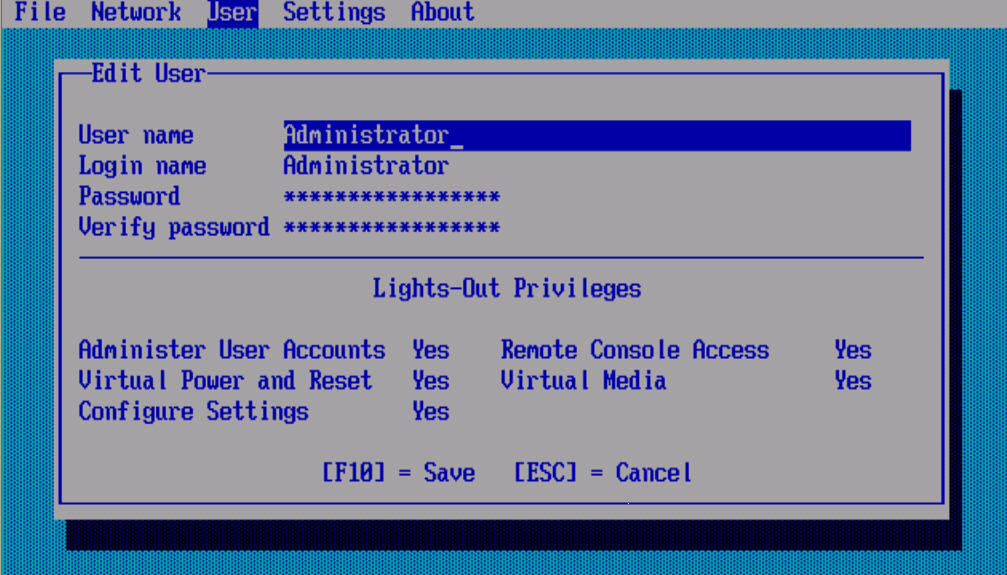
In a worst case scenario where you forgot the user id/ password for ILO login, then only way to reset the password is by connecting physically to the box. Make sure monitor and keyboard is connected to box and boot the machine.
Press F8 to enter into ILO Configuration. Then go to Users -> Modify user and change the ILO admin password which can help to get back to use ILO again.
Change the ILO DNS name
- Before you get started, need to get the static ip address and dns name entry configured for this ILO interface.
- Now login to ILO web interface using default dns name (http://DefaultDNSNAME) using default user id/password if that's not yet changed. let's say http://ILOHPPRO1234567)
- Click on Administration tab -> settings -> network. Then first disable the DHCP.
- Enter correct values for IP Address, subnet mask and Gateway IP Address that you allocated for new ILO DNS Name in Eman.
- Enter new iLO 2 Subsystem Name
And click on "Apply" to make changes effective. Following message will be displayed :
Please wait – iLO 2 is being reset with new changes. You will automatically be redirected to the login page in 59 seconds. If an SSL error message is displayed, please restart your browser and re-login.
It will logout you in one or two minutes. Or you can open the new browser session and now try to login using new ilo DNS name. For example http://newdnsname and it should redirect to login screen.
Troubleshooting ILO DNS Name
But for some reasons if you haven't configured ILO dns correctly, then you may not be able to access the ILO web interface. In this case to debug the configuration, you need to connect that machine physically.
Following are steps:
- Connect Monitor to this machine (connect to front port, it's easy!) and have keyboard connection at the back.
- Power on the machine. Once system start booting… You will see white screen display "HP Proliant Servers …." After this keep on pressing F8 key to get you into ILO configuration Screen.
- Now go to Network -> DHCP menu
* Make sure DHCP is set to OFF (use spacebar to change the settings)
* Verify ILO name has correct value. - Now go to Menu Network -> TCP/IP Go to IP Address selection You can't change these settings if DHCP is ON Update IP Address to new ILP DNS entry. Also Enter correct values for subnet and default getway.
Save the settings (F10) and exit. Now you should be able to login to ILO interface using new dns name like http://newdnsname
Note NIC Mac address
We have connected the server on LAN port 1. Hence note the value of Port 1 NIC MAC address, we will need this value to do the Linux installation using the PXE boot.
Wednesday, October 6, 2010
OS interview questions
- What is MUTEX ?
- What isthe difference between a 'thread' and a 'process'?
- What is INODE?
- Explain the working of Virtual Memory.
- How does Windows NT supports Multitasking?
- Explain the Unix Kernel.
- What is Concurrency? Expain with example Deadlock and Starvation.
- What are your solution strategies for "Dining Philosophers Problem" ?
- Explain Memory Partitioning, Paging, Segmentation.
- Explain Scheduling.
- Operating System Security.
- What is Semaphore?
- Explain the following file systems : NTFS, Macintosh(HPFS), FAT .
- What are the different process states?
- What is Marshalling?
- Define and explain COM?
- What is Marshalling?
- Difference - Loading and Linking ?
Windows sysadmin interview questions
- What is Active Directory schema?
- What are the domain functional level in Windows Server 2003?
- What are the forest functional level in Windows Server 2003?
- What is global catalog server?
- How we can raise domain functional & forest functional level in Windows Server 2003?
- Which is the deafult protocol used in directory services?
- What is IPv6?
- What is the default domain functional level in Windows Server 2003?
- What are the physical & logical components of ADS
- In which domain functional level, we can rename domain name?
- What is multimaster replication?
- What is a site?
- Which is the command used to remove active directory from a domain controler?
- How we can create console, which contain schema?
- What is trust?
- What is the file that's responsible for keep all Active Directory database?
Windows sysadmin interview questions
- What are the required components of Windows Server 2003 for installing Exchange 2003? - ASP.NET, SMTP, NNTP, W3SVC
- What must be done to an AD forest before Exchange can be deployed? - Setup /forestprep
- What Exchange process is responsible for communication with AD? - DSACCESS
- What 3 types of domain controller does Exchange access? - Normal Domain Controller, Global Catalog, Configuration Domain Controller
- What connector type would you use to connect to the Internet, and what are the two methods of sending mail over that connector? - SMTP Connector: Forward to smart host or use DNS to route to each address
- How would you optimise Exchange 2003 memory usage on a Windows Server 2003 server with more than 1Gb of memory? - Add /3Gb switch to boot.ini
- What would a rise in remote queue length generally indicate? - This means mail is not being sent to other servers. This can be explained by outages or performance issues with the network or remote servers.
- What would a rise in the Local Delivery queue generally mean? - This indicates a performance issue or outage on the local server. Reasons could be slowness in consulting AD, slowness in handing messages off to local delivery or SMTP delivery. It could also be databases being dismounted or a lack of disk space.
- What are the standard port numbers for SMTP, POP3, IMAP4, RPC, LDAP and Global Catalog? - SMTP – 25, POP3 – 110, IMAP4 – 143, RPC – 135, LDAP – 389, Global Catalog - 3268
- Name the process names for the following: System Attendant? – MAD.EXE, Information Store – STORE.EXE, SMTP/POP/IMAP/OWA – INETINFO.EXE
- What is the maximum amount of databases that can be hosted on Exchange 2003 Enterprise? - 20 databases. 4 SGs x 5 DBs.
- What are the disadvantages of circular logging? - In the event of a corrupt database, data can only be restored to the last backup.
Subscribe to:
Posts (Atom)